SetShaper features
Budget
Estimate, track, and control
Build from a template or an imported budget. Cast and crew are paid for the days they work, and those days come from your schedule, so moving a day updates the budget on the spot. Follow the money from estimate through actuals, payments, and cashflow.
Shoot day moving, budget total updating
Detailed Budget
Build one from nothing, start from a template, or import an existing budget from Movie Magic Budgeting (.xml) or Excel. Then stop typing numbers you already have: import your cast, a whole crew department, or any element you have given a rate to, and they arrive as budget lines with the figures already in them. Cast bring their day counts from the Day out of Days and crew bring theirs from the Crew Schedule, while the rates come off each person's contact card, so work, hold, travel, rehearsal and fitting days each land at their own rate. Move a shoot day and every one of those lines follows it.
- Two ways to read it The drilldown view takes you into a single account at a time, the way Movie Magic works. A tree view opens the whole budget at once when you would rather see where everything sits.
- Quick add and search Categories and line items go in fast with the quick add buttons that appear on a row as you hover, and a search box finds any line however big the budget gets.
- Math rows The percentage lines every budget needs. Pick which categories, groups, or line items feed one and it stays a true percentage of them, so contingency and insurance follow the budget underneath as it moves.
- Formula rows Turn a line into a formula and write it the way you would in a spreadsheet. Start with an equals sign and reference other line items and whole category totals by name, with autocomplete as you type, so a line can be the sum of three others or a share of a category. Everything downstream recalculates when any of them change.
- Scenarios Build more than one version of the budget in the same project, compare them side by side, and reference one inside another as a sub-budget line.
- Cost by Supplier Every vendor totaled across all accounts, so you can see what each one is owed without hunting through the tree.
- Multi-currency and fringes Run a production in more than one currency. Fringes are the percentages that ride on top of wages, and you set one up once with its rate and its cutoff, then apply it to the lines it belongs on and watch the loaded total appear beside the raw one.
Summary
The top sheet at a glance: total budget against actuals, variance by category, and where the money is going. The one screen to hand a producer.
Actuals
Every line in your budget gets a second number: what you actually spent. Log each expense against its line with a date, a payee, and an amount, then attach the invoice and the proof of payment so the paperwork sits with the figure. The page shows estimated, actual, variance, and what's left in one row, and a line turns red the moment it goes over, so you can drill into a category and find which one did it. Export it as a cost report or to Excel.
Payment Schedule
InnovationTrack exactly when payments land (daily, weekly, or monthly) on a grid, and never miss a deadline.
Cashflow
Money in against money out over the life of the production, with a running balance, so you can see the weeks you will be short and plan the drawdowns before they bite.
Rate Cards
Per-contact rate cards that hold the whole deal: daily, weekly, monthly, or flat billing, a rate for each kind of day (hold, travel, rehearsal, fitting, prep, wrap), plus per diem, kit, buyout, hourly, overtime, and fringes. Apply a role from a rate card onto a person and all of it follows them onto their budget lines.
Schedule
Plan, organize, and logistics
From the stripboard to call sheets, every tool you need to lock your schedule.
Strips reordering into shoot days
Stripboard
The classic drag-and-drop board: scenes as strips you reorder by hand, with day banners, meal breaks, and company moves. Color-coded for interior or exterior and day or night, with running page and time totals down each day. Every move undoes cleanly.
- Schedule Optimizer Innovation An afternoon of dragging strips, done in one click. SetShaper holds twenty-four production rules at once while it lays the script across your shoot days: it shoots each location out before moving on, keeps day and night apart, respects actor and location availability, watches the page count, and keeps a multi-day location on consecutive days. Sliders say what matters most on this show, whether that is grouping locations, evening out the days, or compressing an expensive actor's run. Drop a map pin on each location and it plans the drive too. If what you asked for is impossible it says why, in plain English, before it runs, and one undo puts your old board back exactly as it was.
- Lock what is already booked Right-click a strip for Lock to Day, or a day header for Lock Day, and the optimizer schedules everything else around it. The location you have paid a deposit on and the day your lead flew in for stay exactly where they are.
- Pickup and boneyard Mark shots as done, create pickups for reshoots, and move cut scenes to the boneyard.
Scene Allocator
InnovationA fluid alternative to the stripboard: drag scenes onto days on a visual canvas and watch each day fill, for when you would rather lay things out yourself than hand it to the optimizer.
Call Sheets
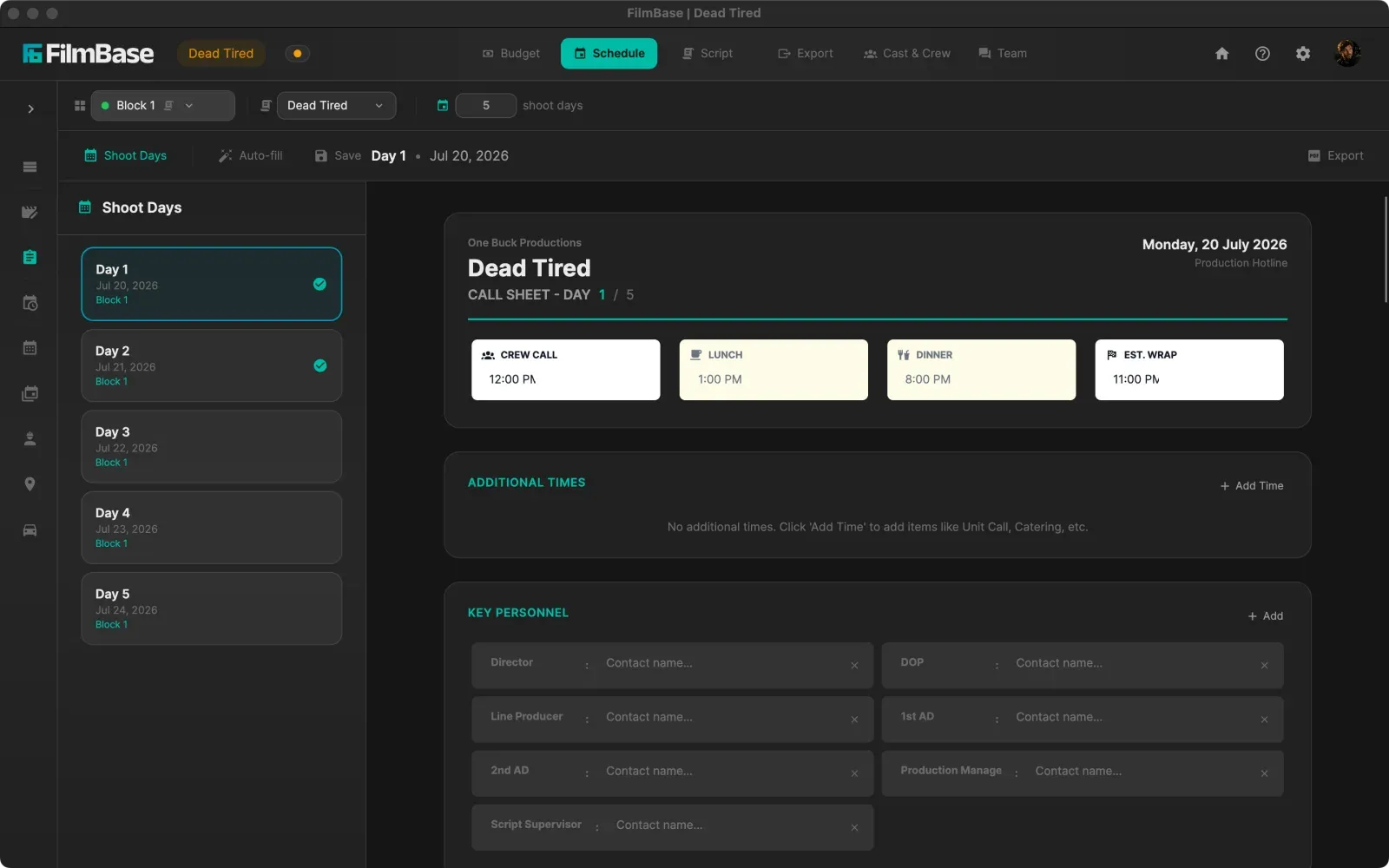
Industry-standard PDFs built from your project data: the day's scenes, cast and call times off the schedule, plus the hospital and location contacts you've saved. Weather fills in for any location with a GPS pin. Add custom rows for anything specific to the day, then bundle the day's sides into the same PDF.
Shoot Schedule
Your shoot laid out on a calendar: every shooting day with its scenes, pages, and call, in a month or week view. The day-by-day picture once the stripboard is locked.
Production Schedule
InnovationA Gantt-style timeline for the whole production: prep, shoot, post, and your shooting blocks as lanes you can add, drag, and resize. Switch to a month or week calendar, and export it as a visual timeline or a dated table.
Day out of Days
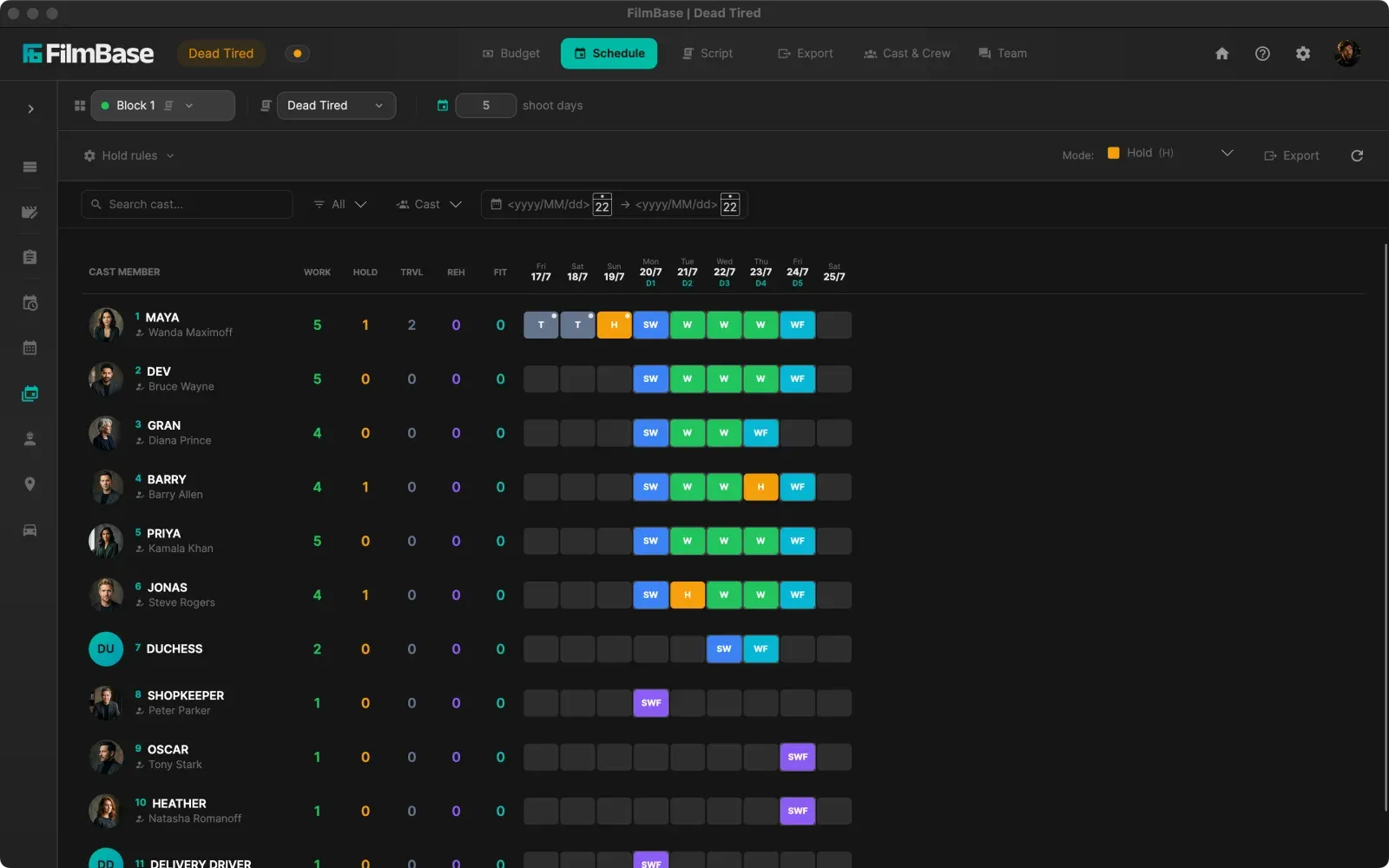
Start/Work/Drop status tracking with live conflict detection for cast and resources. It also feeds cast budgeting, so each actor is priced straight from their work, hold, and travel days.
Crew Schedule
InnovationA per-person grid for the unit: set each crew member's prep, shoot, travel, hold, and wrap days. Import a person or a whole department into the budget and their days come straight from this grid, so giving the gaffer an extra prep week grows the gaffer's budget line on the spot.
Locations
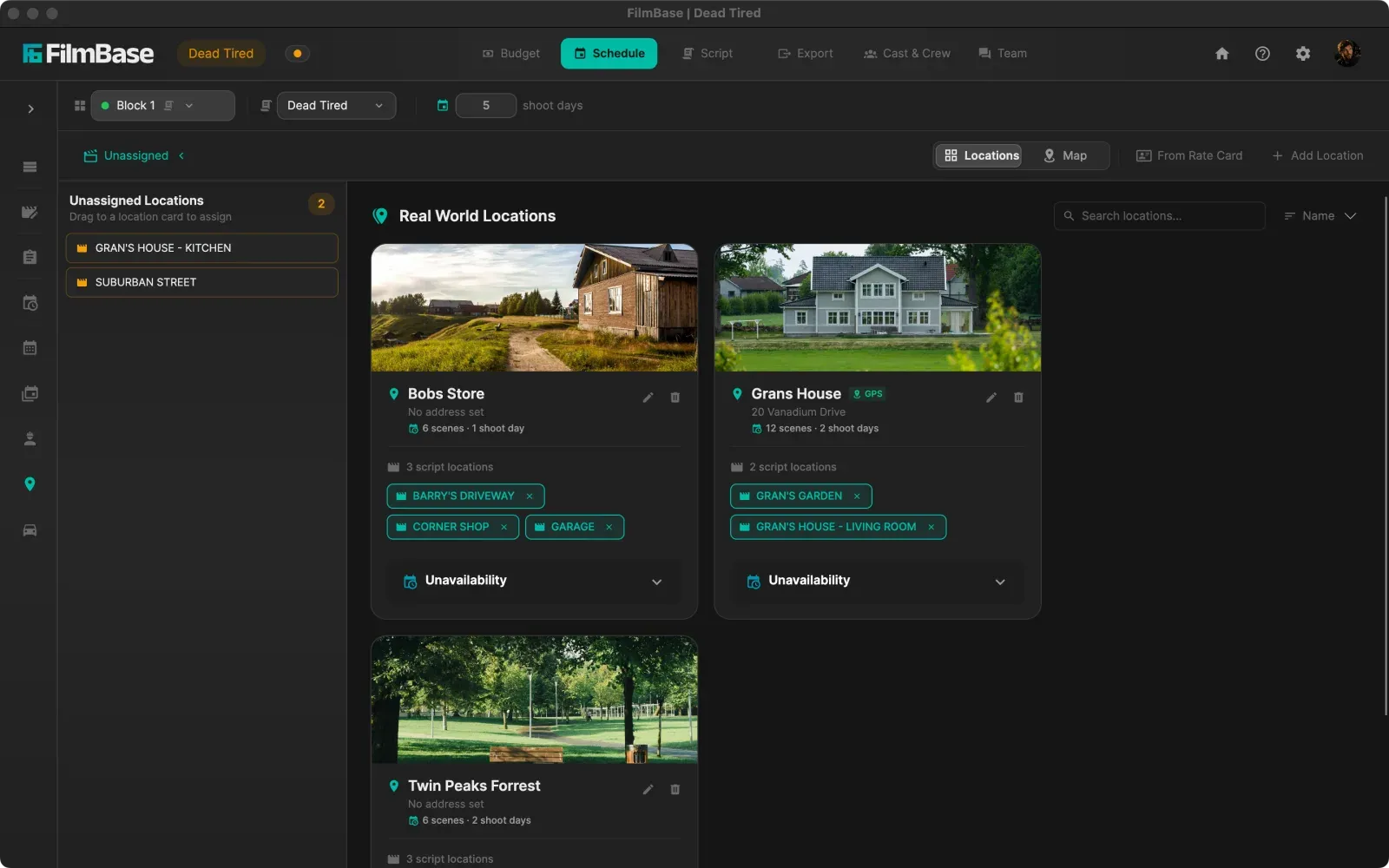
Every shooting location with availability calendars and a map of how they relate. Drop a GPS pin on each and the optimizer uses it to plan the shortest route between them. Each location counts its scenes and shoot days live from the schedule, and imports into the budget like any other element.
Drivers & Transport
Transport runs with passenger manifests that auto-populate from the day's schedule and flow straight onto the call sheet.
Script
Write, breakdown, and analyze
From first draft to final shooting script. Everything lives in one place.
Elements being tagged across a page
Script Editor
A proper screenwriting editor: industry-standard formatting, autocomplete for characters and headings, true dual dialogue, and a title-page editor that exports to PDF. Scene numbers renumber the moment you insert, delete, or merge a scene, so the breakdown and schedule never drift out of sync.
- Revision tracking The industry color sequence, in order: white, then blue, pink, yellow, green and on through goldenrod, buff, salmon and cherry. Every revised paragraph carries its mark and the date it changed, so a page tells you what moved and when.
- Final Draft and PDF import Import FDX or PDF screenplays with scenes, characters, and formatting intact, and export back to Final Draft with full fidelity.
- Locked scene numbers Once you are shooting, lock the numbering and an inserted scene becomes 2A rather than renumbering the script. Every number already on a stripboard, a Day out of Days, a call sheet or a set of sides keeps meaning what it meant.
Breakdown
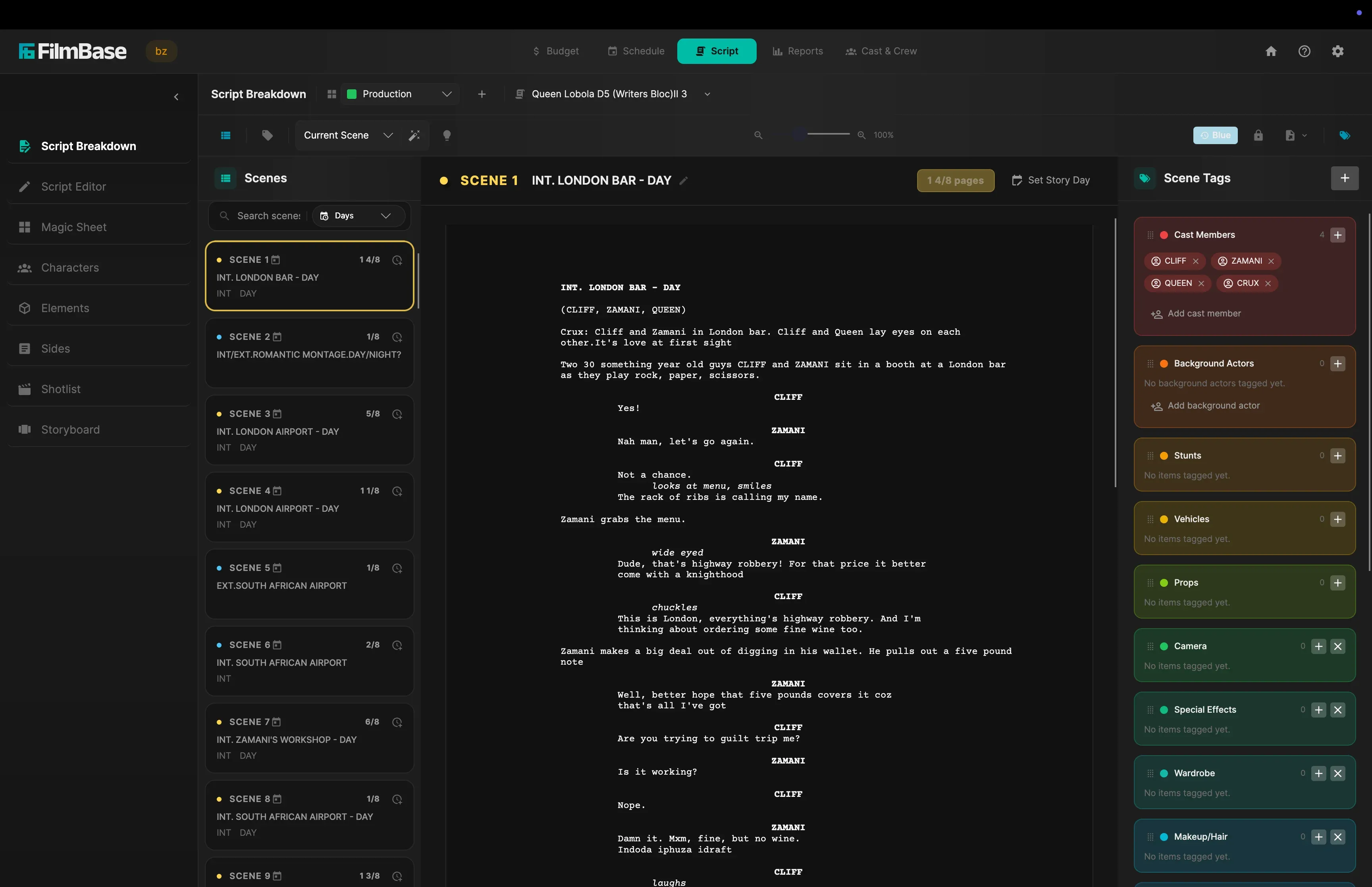
InnovationTag props, cast, vehicles, and wardrobe straight in the text, or let SetShaper's AI find them for you to confirm or skip. It runs on your own computer, so nothing is uploaded. Promote a tag to a tracked element and it flows into the budget, then use the Magic Sheet to pick the other scenes it appears in. Fix a slugline or flip a scene night-to-day right here.
Characters
Bios, reference image boards, and cast assignments, with the actor's photo as the avatar. Connect the props, wardrobe, and vehicles each character uses, then pick the scenes or story days they appear in.
Elements
One place for every prop, vehicle, and wardrobe item in your project, linked to the scenes, the budget, and the characters who use them.
Sides
Automatically generate script sides for each shoot day, in script order or shooting order.
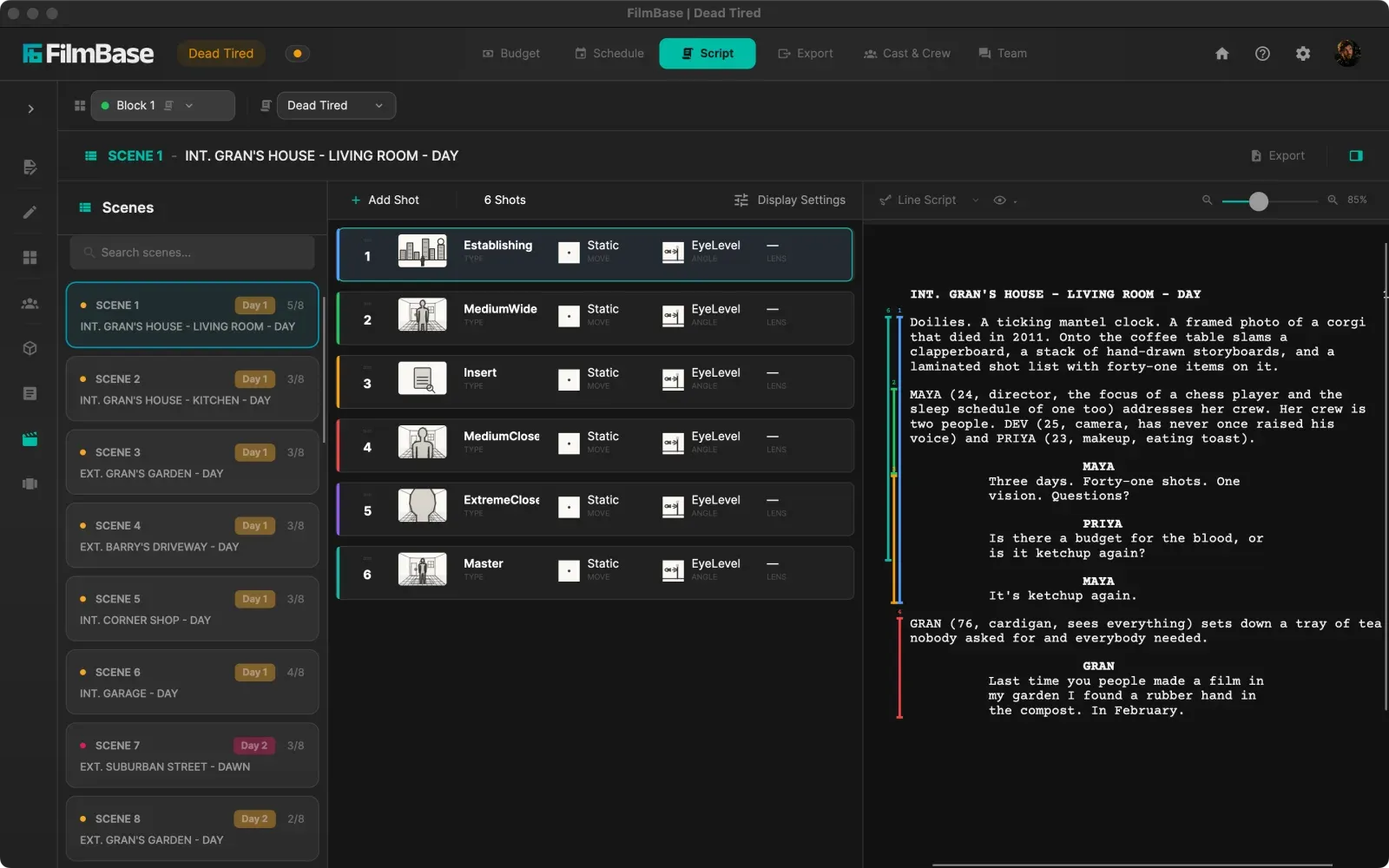
Shotlist
Link camera angles, movement and lenses to every scene, and every shot without a photo gets an automatic, hand-drawn diagram of the framing.
Shots becoming boards, then playing as an animatic
Storyboard
Storyboards linked to scenes, with timed animatic playback and video export. Shots without art are auto-sketched from the shot size, angle, and subject. Set the characters, pose, and interior or exterior, and a bird's-eye even goes top-down. Direct the cut before you direct the shoot.
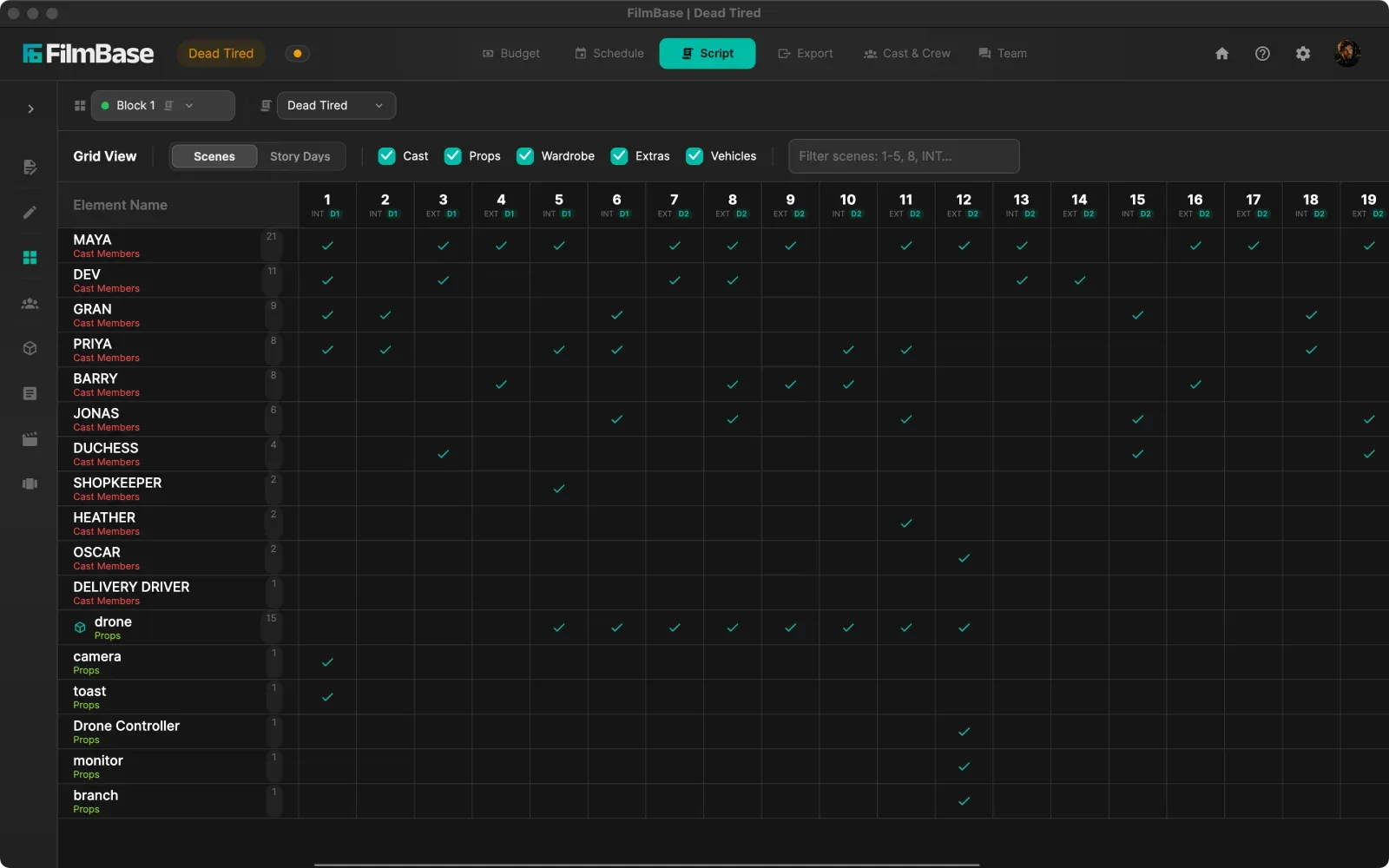
Magic Sheet
A grid of every element against every scene, or every story day. Tick tags on and off straight from the grid, and filter by category or by scene.
Cast & Crew
Your people, one database
Your people are your production. Everyone on the production in one list.
A rate card applied to a person
Contacts
Cast, crew, suppliers, and background in one rolodex, with rates, availability calendars, dietary needs, and demographic tracking. Import from Excel or CSV.
- Cast tiers Classify cast as Lead, Supporting, Day Player, or your own tiers. Set once, shared across every project, and shown on the character, the contact list, and the budget.
Departments
Group the crew by department, with a standard day, week, and month rate on each role. That's the house rate a person is priced at until they have their own deal. Switch a department to a table to edit those rates in place, and see who holds each role.
Rate Card Library
Reusable rate cards and fringes organized in a folder tree, shared across every project. Card types for crew scales, cast tiers, agency rosters, and supplier and location items, each showing only the boxes that apply. Import and export as a SetShaper file or an Excel workbook that opens anywhere and imports straight back.
- Cards organized your way Folders in projects as well as the library. Expand a card in the tree to its categories and items: click to jump, drag items between categories or into another card of the same type, and create categories without leaving the tree.
- Guided rate-sheet import Bring in an Excel or CSV rate sheet: pick the card type and the column choices adapt to it, map your columns, then create a new card or add the rows to an existing card of the same type.
- Currency-aware cards Each card holds its rates in its own currency, chosen from a broad world-currency list. Import a card in a currency your project doesn't have and SetShaper asks for the exchange rate, then adds the currency or converts the rates to your base.
Reports
Documents ready for distribution
Generate the documents your production needs, formatted and branded for distribution. Every export has a live PDF preview.
An export previewing, then saving as PDF
Financial
Top sheet, detailed budget, cost report, a two-scenario comparison, an above and below the line breakdown, plus payment schedule and cashflow with a date range. The reports producers and investors expect, as PDF, or as Excel with the formulas still live so the numbers recalculate when someone edits them.
Scheduling
One-liners, day breaks, shooting schedules, stripboard exports, and detailed production logs.
Team Hub
InnovationShare structured project packages without the cloud. Teammates import a unified file and SetShaper auto-merges their changes into yours.
Team
Your whole team, one project
Invite your team and work on the same budget, schedule, script, and breakdown at once, in real time. It stays private over your local network. Changes go straight between computers, never through a server.
An edit appearing on a teammate's screen
Members
Invite anyone on your team network and give them a role. The role decides what they see, and SetShaper ships with Admin, Line Producer, Scheduler and Intern to start from.
- Whole tabs disappear A role that cannot see the budget does not get a Budget tab. Invite a scheduler and their copy opens on the schedule, with no way in to the money at all. It works page by page too, so someone can have the stripboard and call sheets without the Day out of Days.
- Actuals without the estimates The one people ask for. An intern can open Actuals and capture spend against every line, attaching invoices as they go, while the estimated figures stay hidden. They see what the production is spending without seeing what it was budgeted at.
- Roles of your own Build a role from the individual permissions when the shipped four are not the shape of your production, and adjust a collaborator on top of their role for one project.
Chat
A chat per project, right next to the work. Notes and decisions stay where you need them instead of in a group text.
History
Every edit saved under the name of whoever made it. Filter the feed, then revert one change or a stack of them. If someone touched it since, SetShaper warns you first.
Network
Create a named team network on your LAN. Everyone joins and becomes invitable to any project over P2P, with nothing on a server.
- Real-time team sync Budget, schedule, script, stripboard, and breakdown changes appear on teammates' screens as they happen. Conflict-aware, so concurrent edits don't flip-flop.
- Peer-to-peer Direct between computers over your network. Nothing on a server, and instant. Exactly what you want on a closed set.
- Private by design Your production data never leaves your computers. No server, no cloud account, no third party in the middle.
- Across the internet Working in different cities? Put everyone on one virtual LAN with an overlay like ZeroTier and SetShaper syncs between you as if you were in the same room.
Settings
Your studio, your rules
Set the app up to match how your team works.
Switching theme and accent color
Region & Format
Pick your territory and paper size, time format, and temperature unit follow. Scripts stay on Letter so industry pagination holds, wherever you print.
- Branded for distribution Put your production company and show logos on every PDF, set where they sit and how big, and edit the footer note. Set once and every export follows.
Appearance
Light and dark themes with accent customization.
Backups
Automatic quick backups every time a project opens, with one-click restore from the Project Hub.
Private by default
Each production is a folder on your own computer, holding the project file alongside your contact photos, invoices and exports. No account required to work, and no server ever touches your data.
Project Hub
Every production in one place: create, rename, duplicate, archive, or import a project, and restore an earlier backup without opening it first.
Onboarding wizard
Six steps from install to your first project: license agreement, subscription, your profile, and the defaults every production will inherit.
Global & project settings
Set your defaults once for everything you make, and change them on a production that needs its own rules.
Ready to run your production
in one place?
Every feature above is included in both plans. No tiers, no add-ons. Try all of it free for 7 days.